


![GTFP Add-On Vehicle Scanner [BETA] [Windows - New]](https://img.gta5-mods.com/q75-w500-h333-cfill/images/gtfp-add-on-vehicle-scanner-beta-windows-new/264c0d-Screenshot.1.png "GTFP Add-On Vehicle Scanner [BETA] [Windows - New]")


11.090
115
11.090
115
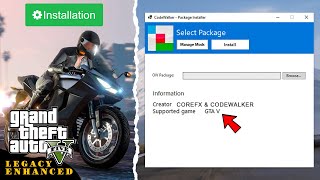
OIV Package Installer is a lightweight alternative to the OpenIV Package Installer. Built on the CodeWalker core, it offers a clean, reliable interface for installing OIV modification packages for Grand Theft Auto V Legacy and Enhanced.
Source Code: https://github.com/crxhvrd/CodeWalkerProjects
CoreFX Modding Discord Server: https://discord.com/invite/jK4SRmBqYt
Features:
- Full Compatibility: Works with all existing OIV mods and packages.
- Uninstall mods via Manage Mods: Safely remove installed mods using the built-in manager.
- Clean Interface: A familiar UI inspired by OpenIV, providing a clear summary of package metadata.
- Game Support: Fully supports both GTA V Legacy and GTA V Enhanced versions.
- Smart Validation: Automatically validates your game version against the mod's requirements to prevent compatibility issues.
- Safe & Secure: Properly handles file placement logic, ensuring DLC packs and RPF modifications are correctly installed to your mods folder.
Requirements:
To ensure your mods folder works correctly, you must have the appropriate mods loader installed:
- GTA V Legacy: Requires OpenIV.asi
- GTA V Enhanced: Requires OpenRPF.asi
Important Note:
Please ensure the mod you are installing is compatible with your game version. Legacy mods cannot be installed on GTA V Enhanced, and Enhanced mods cannot be installed on GTA V Legacy. Installing incompatible mods will cause your game to crash.
How to Use:
1. Launch CodeWalker.OIVInstaller.exe.
2. Select your .oiv package file.
3. Select your GTA V game folder.
4. Click Install and wait for the process to complete.
5. Use the Manage Mods tab to uninstall mods if needed.
For Mod Creators:
The installer validates the <gameversion> tag in assembly.xml to ensure your mod is installed on the correct game version.
To enforce game version validation, add the <gameversion> tag to your assembly.xml file inside the <package> element.
Example for Enhanced Edition:
<gameversion>enhanced</gameversion>
Example for Legacy Edition:
<gameversion>legacy</gameversion>
Changelog:
1.0 - Initial release
1.1 - Added Manage Mods (now you can safely remove what you're installed), full OpenIV Format 2.2 Metadata support, Documentation and lots of fixes
1.2 - Added complete support for OpenIV Package Format 2.2 (Text, XML, PSO, Archive editing). Introduced Smart Uninstall to revert specific lines/nodes instead of restoring full files. Added full support for Add-on DLCs with clean uninstallation. Check "Docs" inside the app to see all supported features and todo list.
1.3 - Fixed .ytd file corruption after uninstalling mods via Manage Mods, added install/uninstall log files inside game folder, added better theme support & better stylized installation terminal output.
1.4 - Added CLI version of the app, supports automated .bat scripted mod installations & uninstallations. Batch examples can be found inside our Github source code project
All commands available in Docs -> User Guide.
1.5 - Improved CLI version of the app, advanced logic of install & uninstall mods via CLI with much more safety checks. Added Batch Examples into an archive so you can create your own CLI mod installer based on OIV Package Installer.
1.6 - Added FiveM Mods Auto Install (Experimental), improved PSO/META file editing, added more flags to CLI version of the app.
1.6.1 - Fixed metadata file parsing by trimming UTF-8 BOM.
Source Code: https://github.com/crxhvrd/CodeWalkerProjects
CoreFX Modding Discord Server: https://discord.com/invite/jK4SRmBqYt
Features:
- Full Compatibility: Works with all existing OIV mods and packages.
- Uninstall mods via Manage Mods: Safely remove installed mods using the built-in manager.
- Clean Interface: A familiar UI inspired by OpenIV, providing a clear summary of package metadata.
- Game Support: Fully supports both GTA V Legacy and GTA V Enhanced versions.
- Smart Validation: Automatically validates your game version against the mod's requirements to prevent compatibility issues.
- Safe & Secure: Properly handles file placement logic, ensuring DLC packs and RPF modifications are correctly installed to your mods folder.
Requirements:
To ensure your mods folder works correctly, you must have the appropriate mods loader installed:
- GTA V Legacy: Requires OpenIV.asi
- GTA V Enhanced: Requires OpenRPF.asi
Important Note:
Please ensure the mod you are installing is compatible with your game version. Legacy mods cannot be installed on GTA V Enhanced, and Enhanced mods cannot be installed on GTA V Legacy. Installing incompatible mods will cause your game to crash.
How to Use:
1. Launch CodeWalker.OIVInstaller.exe.
2. Select your .oiv package file.
3. Select your GTA V game folder.
4. Click Install and wait for the process to complete.
5. Use the Manage Mods tab to uninstall mods if needed.
For Mod Creators:
The installer validates the <gameversion> tag in assembly.xml to ensure your mod is installed on the correct game version.
To enforce game version validation, add the <gameversion> tag to your assembly.xml file inside the <package> element.
Example for Enhanced Edition:
<gameversion>enhanced</gameversion>
Example for Legacy Edition:
<gameversion>legacy</gameversion>
Changelog:
1.0 - Initial release
1.1 - Added Manage Mods (now you can safely remove what you're installed), full OpenIV Format 2.2 Metadata support, Documentation and lots of fixes
1.2 - Added complete support for OpenIV Package Format 2.2 (Text, XML, PSO, Archive editing). Introduced Smart Uninstall to revert specific lines/nodes instead of restoring full files. Added full support for Add-on DLCs with clean uninstallation. Check "Docs" inside the app to see all supported features and todo list.
1.3 - Fixed .ytd file corruption after uninstalling mods via Manage Mods, added install/uninstall log files inside game folder, added better theme support & better stylized installation terminal output.
1.4 - Added CLI version of the app, supports automated .bat scripted mod installations & uninstallations. Batch examples can be found inside our Github source code project
All commands available in Docs -> User Guide.
1.5 - Improved CLI version of the app, advanced logic of install & uninstall mods via CLI with much more safety checks. Added Batch Examples into an archive so you can create your own CLI mod installer based on OIV Package Installer.
1.6 - Added FiveM Mods Auto Install (Experimental), improved PSO/META file editing, added more flags to CLI version of the app.
1.6.1 - Fixed metadata file parsing by trimming UTF-8 BOM.
First Uploaded: Luns 19 de Xaneiro de 2026
Last Updated: Mércores 4 de Marzo de 2026
Last Downloaded: 13 minuto
73 Comments
OIV Package Installer is a lightweight alternative to the OpenIV Package Installer. Built on the CodeWalker core, it offers a clean, reliable interface for installing OIV modification packages for Grand Theft Auto V Legacy and Enhanced.
Source Code: https://github.com/crxhvrd/CodeWalkerProjects
CoreFX Modding Discord Server: https://discord.com/invite/jK4SRmBqYt
Features:
- Full Compatibility: Works with all existing OIV mods and packages.
- Uninstall mods via Manage Mods: Safely remove installed mods using the built-in manager.
- Clean Interface: A familiar UI inspired by OpenIV, providing a clear summary of package metadata.
- Game Support: Fully supports both GTA V Legacy and GTA V Enhanced versions.
- Smart Validation: Automatically validates your game version against the mod's requirements to prevent compatibility issues.
- Safe & Secure: Properly handles file placement logic, ensuring DLC packs and RPF modifications are correctly installed to your mods folder.
Requirements:
To ensure your mods folder works correctly, you must have the appropriate mods loader installed:
- GTA V Legacy: Requires OpenIV.asi
- GTA V Enhanced: Requires OpenRPF.asi
Important Note:
Please ensure the mod you are installing is compatible with your game version. Legacy mods cannot be installed on GTA V Enhanced, and Enhanced mods cannot be installed on GTA V Legacy. Installing incompatible mods will cause your game to crash.
How to Use:
1. Launch CodeWalker.OIVInstaller.exe.
2. Select your .oiv package file.
3. Select your GTA V game folder.
4. Click Install and wait for the process to complete.
5. Use the Manage Mods tab to uninstall mods if needed.
For Mod Creators:
The installer validates the <gameversion> tag in assembly.xml to ensure your mod is installed on the correct game version.
To enforce game version validation, add the <gameversion> tag to your assembly.xml file inside the <package> element.
Example for Enhanced Edition:
<gameversion>enhanced</gameversion>
Example for Legacy Edition:
<gameversion>legacy</gameversion>
Changelog:
1.0 - Initial release
1.1 - Added Manage Mods (now you can safely remove what you're installed), full OpenIV Format 2.2 Metadata support, Documentation and lots of fixes
1.2 - Added complete support for OpenIV Package Format 2.2 (Text, XML, PSO, Archive editing). Introduced Smart Uninstall to revert specific lines/nodes instead of restoring full files. Added full support for Add-on DLCs with clean uninstallation. Check "Docs" inside the app to see all supported features and todo list.
1.3 - Fixed .ytd file corruption after uninstalling mods via Manage Mods, added install/uninstall log files inside game folder, added better theme support & better stylized installation terminal output.
1.4 - Added CLI version of the app, supports automated .bat scripted mod installations & uninstallations. Batch examples can be found inside our Github source code project
All commands available in Docs -> User Guide.
1.5 - Improved CLI version of the app, advanced logic of install & uninstall mods via CLI with much more safety checks. Added Batch Examples into an archive so you can create your own CLI mod installer based on OIV Package Installer.
1.6 - Added FiveM Mods Auto Install (Experimental), improved PSO/META file editing, added more flags to CLI version of the app.
1.6.1 - Fixed metadata file parsing by trimming UTF-8 BOM.
Source Code: https://github.com/crxhvrd/CodeWalkerProjects
CoreFX Modding Discord Server: https://discord.com/invite/jK4SRmBqYt
Features:
- Full Compatibility: Works with all existing OIV mods and packages.
- Uninstall mods via Manage Mods: Safely remove installed mods using the built-in manager.
- Clean Interface: A familiar UI inspired by OpenIV, providing a clear summary of package metadata.
- Game Support: Fully supports both GTA V Legacy and GTA V Enhanced versions.
- Smart Validation: Automatically validates your game version against the mod's requirements to prevent compatibility issues.
- Safe & Secure: Properly handles file placement logic, ensuring DLC packs and RPF modifications are correctly installed to your mods folder.
Requirements:
To ensure your mods folder works correctly, you must have the appropriate mods loader installed:
- GTA V Legacy: Requires OpenIV.asi
- GTA V Enhanced: Requires OpenRPF.asi
Important Note:
Please ensure the mod you are installing is compatible with your game version. Legacy mods cannot be installed on GTA V Enhanced, and Enhanced mods cannot be installed on GTA V Legacy. Installing incompatible mods will cause your game to crash.
How to Use:
1. Launch CodeWalker.OIVInstaller.exe.
2. Select your .oiv package file.
3. Select your GTA V game folder.
4. Click Install and wait for the process to complete.
5. Use the Manage Mods tab to uninstall mods if needed.
For Mod Creators:
The installer validates the <gameversion> tag in assembly.xml to ensure your mod is installed on the correct game version.
To enforce game version validation, add the <gameversion> tag to your assembly.xml file inside the <package> element.
Example for Enhanced Edition:
<gameversion>enhanced</gameversion>
Example for Legacy Edition:
<gameversion>legacy</gameversion>
Changelog:
1.0 - Initial release
1.1 - Added Manage Mods (now you can safely remove what you're installed), full OpenIV Format 2.2 Metadata support, Documentation and lots of fixes
1.2 - Added complete support for OpenIV Package Format 2.2 (Text, XML, PSO, Archive editing). Introduced Smart Uninstall to revert specific lines/nodes instead of restoring full files. Added full support for Add-on DLCs with clean uninstallation. Check "Docs" inside the app to see all supported features and todo list.
1.3 - Fixed .ytd file corruption after uninstalling mods via Manage Mods, added install/uninstall log files inside game folder, added better theme support & better stylized installation terminal output.
1.4 - Added CLI version of the app, supports automated .bat scripted mod installations & uninstallations. Batch examples can be found inside our Github source code project
All commands available in Docs -> User Guide.
1.5 - Improved CLI version of the app, advanced logic of install & uninstall mods via CLI with much more safety checks. Added Batch Examples into an archive so you can create your own CLI mod installer based on OIV Package Installer.
1.6 - Added FiveM Mods Auto Install (Experimental), improved PSO/META file editing, added more flags to CLI version of the app.
1.6.1 - Fixed metadata file parsing by trimming UTF-8 BOM.
First Uploaded: Luns 19 de Xaneiro de 2026
Last Updated: Mércores 4 de Marzo de 2026
Last Downloaded: 13 minuto
 5mods on Discord

@Motherflippin' I use the last updated lml in the latest game and it works fine, I don't know why so many people say it doesn't work in the comment section
@safari4831 Thank you so much for implementing CLI support!
@JoyLucien Probably because they aren't using RagePluginHook alongside it, as instructed on the LSPDFR website
@Pizzahut No need for RagePluginHook, just the lml file works fine, and through communication with one of them, I found out that it might be caused by some script they installed to scan memory
Uninstalling OIV files was something I didnt think we'd have to wait so long for.
@safari4831 There seems to be an issue editing certain XML/META files:
[16:20:03] ERROR editing XML common/data/ai/scenarios.meta: Data at the root level is invalid. Line 1, position 1.
Dont think I've seen this with the built-in openiv installer
what a chad you are to do this tool, thank you!
Hi there, I appreciate your tool. If you are open to requests, may I suggest:
- a `--force` or `--ignore_gameversion` flag to ignore gameversion (some old packages do not include them)
- a `--skip_backup` flag to not back up the original files (which takes lots of space)
Again, thank you for this awesome tool.
I made a python script to spawn a subprocess that calls your .exe with (1) path to game (2) path to .exe (3) path to folder of .oiv packages. Even better if you could add the flags I suggested earlier. Made a PR on your fork.
@votrinhan88 hello, thanks, will be implemented soon
@safari4831
I have two modifications:
1. World of Variety
2. Natural Vision Enhanced
NVE uses onigiri, which conflicts with the use of OpenRPF.asi.
Again, OpenRPF.asi is required for the OIV Package Installer to work properly.
The question is: Is there any way to get the OIV Package Installer working and able to install modifications so that it works with Natural Vision Enhanced?
From what I understand, this should be done in the onigiri folder instead of the mods folder.
Is this something we can achieve?
Instead of modifying and changing assembly.xml, maybe the OIV Package Installer could have an optional "install for onigiri" option [NVE].
What do you think?
While minimal help, would this be an improvement if it can't be fully automated?
@RemixPL1994 hello, both NVE and World of Variety can use OIV Package Installer source code to create their own mod installers if they want. Mods should use OpenIV Package Format 2.2 and packed inside .oiv file to work, so if mod creators don't make .oiv packages for their mods - OIV Package Installer can't work with this
@safari4831 Just wanted to reflag the concern about your installer being unable to parse the BOM at the beginning of files like scenarios.meta
Might be able to do a quick hack to trim the BOM right before here: https://github.com/crxhvrd/CodeWalkerProjects/blob/master/CodeWalker.OIVInstaller/OivInstaller.cs#L741
@LeetSombrero fixed that, try again
@safari4831 Works like a charm now thank you! Revert feature is goated. Going to recommend this mod in any OIV installation I make moving forward.
Such an amazing Tool. Thank you, a genuine thank you to all who made it. Also another HUGE THANK YOU for making it open source!! I am making a modpack, and because of the open source nature I was able to edit the mainstream.cs to create an import and export save feature for my modpack using Grok AI. Thank you so much. It works like a charm
In theory this tool should be able to install OIV packs in GTA 4 too if edited via the source code, right?
@geniusn8 this tool uses CodeWalker core to operate, only GTA 5 is supported
Thats a little disappointing. But its alright. Any other custom installer like this for gta 4?